The gimp meaning refers to GNU Image Manipulation Program, a powerful free and open-source photo editing software. GIMP offers professional-grade tools for image retouching, graphic design, and digital art without costing a single dollar. It is one of the most popular Photoshop alternatives used by millions worldwide.
Have you ever heard people talk about gimp meaning and wondered what all the fuss is about? Maybe you saw the word GIMP online and thought it was just some random tech term. But here is the truth. GIMP is one of the most powerful and free image editing tools on the planet. Whether you are a beginner learning photo editing or a pro looking for a Photoshop alternative, GIMP has something to offer you.
In this article, we will break down the gimp meaning in simple terms. We will explore what GIMP is, why it matters, and how it can transform your creative work. By the end, you will understand why so many people trust this tool for photo editing, digital art, and image manipulation. So let us dive right in.
Key Takeaways
- GIMP stands for GNU Image Manipulation Program and is a free, open-source raster graphics editor.
- GIMP meaning connects to a long history of community-driven software development since 1996.
- Key features include layers, filters, color correction, and advanced image manipulation tools.
- GIMP is a top Photoshop alternative for budget-conscious creatives and professionals alike.
- It supports multiple platforms including Windows, macOS, and Linux.
- GIMP is important for photo editing, digital art, web design, and graphic design workflows.
- Learning GIMP opens doors to professional-level editing without subscription fees.
📑 Table of Contents
What Does GIMP Stand For?
The full form of GIMP is GNU Image Manipulation Program. The name tells you a lot about what the software does. It is a program designed to manipulate images. The GNU part stands for a free software project that believes in open-source technology. This means anyone can use, modify, and share GIMP without paying a dime.
GIMP was first released in 1996. Since then, it has grown into a full-featured raster graphics editor. A raster graphics editor works with pixels. That means it is perfect for photo retouching, color correction, and creating detailed digital artwork. The software is maintained by a community of developers who keep improving it with every update.
Why the Name Matters
Understanding the gimp meaning goes beyond just the acronym. The name reflects the software’s core mission. It is built to give users complete control over their images. You are not locked into a subscription. You are not limited by watermarks. You get a professional-grade tool that belongs to you.
Many people search for gimp meaning because they are curious about what this software can do. The name itself signals power and flexibility. It tells you right away that this is a serious tool for serious work.
What Is GIMP and How Does It Work?
At its core, GIMP is a free image editor that lets you create, edit, and enhance digital images. It works on pixels, just like Photoshop. You can load photos, apply effects, adjust colors, and combine multiple images into one composition. The interface might look a bit different from what you are used to, but the capabilities are impressive.
GIMP runs on three major operating systems. You can use it on Windows, macOS, and Linux. This broad compatibility makes it accessible to almost everyone. Whether you are on a desktop or a laptop, GIMP has you covered.
The Interface Explained
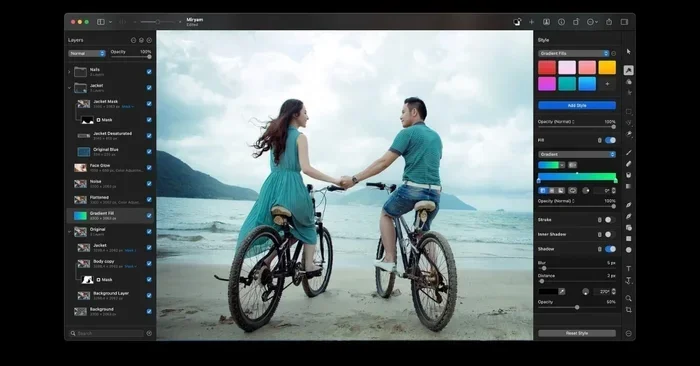
When you first open GIMP, the layout might feel a little overwhelming. There are panels, menus, and toolbars everywhere. But once you spend a few minutes learning the basics, it all clicks into place. The main workspace includes a canvas area where your image sits. On the sides, you will find tool panels and layer controls.
The layers system is one of the most important features. Layers let you work on different parts of an image separately. Think of it like stacking transparent sheets of paper. You can edit one layer without affecting the others. This makes complex image composition much easier and more flexible.
How GIMP Handles Files
GIMP supports a wide range of file formats. You can open JPEGs, PNGs, TIFFs, and even RAW photo files. When you save your work, you have many options. The native format is XCF, which preserves all your layers and editing data. You can also export to common formats like PNG and JPEG for sharing online or printing.
This flexibility is a huge advantage. You are not stuck with proprietary file types that only work in one software. GIMP gives you freedom to work with whatever format fits your needs.
Key Features of GIMP That Make It Powerful
Now let us talk about what makes GIMP stand out. The gimp meaning becomes clear when you see the features in action. This software packs professional-level tools into a free package. Here is what you get.
Advanced Selection Tools
GIMP offers a variety of selection tools that let you isolate parts of an image. You can use the free select tool for freeform shapes, the fuzzy select tool for similar-colored areas, and the path tool for precise vector-based selections. These tools make it easy to cut out objects, apply targeted edits, or create clean composites.
Color Correction and Enhancement
Color correction is at the heart of any good image editor. GIMP provides levels, curves, and histogram tools for adjusting brightness, contrast, and color balance. You can also use the color balance and hue-saturation controls to fine-tune your photos. These tools rival anything you will find in paid software.
Filters and Effects
GIMP comes loaded with built-in filters. You can add blur effects, sharpen details, apply artistic filters, and create stunning visual effects. The filter gallery gives you quick access to popular effects. You can also install additional plugins and scripts to expand your options even further.
Scripting and Automation
For advanced users, GIMP supports scripting languages like Python and Scheme. This means you can automate repetitive tasks and create custom workflows. If you process hundreds of images regularly, scripting can save you hours of work. It is one of the features that sets GIMP apart from simpler photo editing tools.
Plugin Support
The GIMP community has created thousands of plugins and scripts. These add-ons can extend the software’s functionality in amazing ways. Need a new filter? There is probably a plugin for that. Want better text tools? Someone has already built it. This ecosystem of community contributions keeps GIMP growing and evolving.
Why GIMP Is So Important for Users
The gimp meaning goes deeper than just software features. GIMP represents something bigger in the world of digital creativity. It stands for freedom, accessibility, and empowerment. Here is why it matters so much.
It Is Completely Free
The most obvious reason GIMP is important is that it costs nothing. You do not need a monthly subscription. You do not need to pay for updates. Once you download GIMP, it is yours forever. This makes professional-grade image editing accessible to anyone with a computer.
For students, hobbyists, and small businesses, this is a game-changer. You get powerful tools without the financial burden. Many people cannot afford expensive software like Photoshop. GIMP bridges that gap completely.
It Promotes Open-Source Philosophy
GIMP is built on the open-source model. This means the source code is publicly available. Anyone can inspect it, modify it, or contribute to its development. This transparency builds trust and encourages innovation. The community-driven nature of GIMP ensures it stays relevant and responsive to user needs.
Open-source software also promotes digital literacy. When you use GIMP, you are not just editing photos. You are participating in a global movement of collaborative creation and knowledge sharing.
It Serves as a Professional Tool
Do not let the price tag fool you. GIMP is used by professionals around the world. Freelance designers, independent artists, and small studios rely on GIMP for their daily work. It handles digital art, photo retouching, and graphic design projects with ease.
Many professionals choose GIMP because it gives them full control. There are no feature limitations based on your subscription tier. Every tool is available to every user. This equality in access is what makes GIMP truly special.
It Encourages Learning and Skill Building
Learning GIMP teaches you fundamental concepts of digital image processing. You understand how layers work, how colors blend, and how filters transform images. These skills transfer to other software too. If you ever switch to a different editor, your knowledge of GIMP will still be valuable.
Many educators use GIMP in classrooms because it is free and feature-rich. Students can learn image manipulation and graphic design without worrying about software costs. This makes GIMP an important tool in digital education.
GIMP vs Other Image Editors
When people search for gimp meaning, they often want to know how it compares to other tools. Let us look at how GIMP stacks up against the competition.
GIMP vs Photoshop
Photoshop is the industry standard for photo editing. It is powerful, polished, and packed with features. But it also comes with a steep price tag. Adobe charges around $20 to $50 per month for a Photoshop subscription. Over a year, that adds up to $240 to $600.
GIMP offers many of the same core features for free. You get layers, filters, selection tools, and color correction. The learning curve is similar, though GIMP’s interface takes some getting used to. For most users, GIMP covers 90% of what Photoshop does. The remaining 10% includes advanced features like content-aware fill and cloud integration.
GIMP vs Canva
Canva is popular for quick, template-based designs. It is great for social media posts and simple graphics. But Canva is not a true raster graphics editor. It does not offer the same level of control over pixel-level editing. GIMP wins when you need deep, detailed image manipulation and professional photo retouching.
GIMP vs Paint.NET
Paint.NET is another free image editor, but it is simpler. It works well for basic tasks like cropping, resizing, and simple adjustments. GIMP, on the other hand, offers a much broader feature set. Think of Paint.NET as a lightweight option and GIMP as the full-featured alternative.
| Feature | GIMP | Photoshop | Canva | Paint.NET |
|---|---|---|---|---|
| Price | Free | $20-$50/month | Free/Paid | Free |
| Platforms | Windows, Mac, Linux | Windows, Mac | Web-based | Windows |
| Layers | Yes | Yes | Limited | Yes |
| Advanced Filters | Yes | Yes | No | Limited |
| Scripting Support | Yes | Yes | No | No |
| RAW File Support | Yes (with plugin) | Yes | No | No |
| Best For | Professional editing | Industry standard | Quick designs | Basic edits |
GIMP vs Affinity Photo
Affinity Photo is a one-time-purchase alternative to Photoshop. It costs around $70 and offers excellent features. GIMP is still free, which gives it a clear advantage for budget-conscious users. Affinity Photo has a more polished interface and better performance in some areas. But GIMP’s plugin ecosystem and open-source nature make it a strong competitor.
Who Should Use GIMP?
The gimp meaning applies to a wide range of users. You do not need to be a professional designer to benefit from this software. Here is who can get the most out of GIMP.
- Students and educators learning digital art and graphic design.
- Freelancers who need professional editing tools without subscription costs.
- Hobbyists who enjoy photo editing and digital art as a creative outlet.
- Small business owners who create their own marketing materials and social media graphics.
- Open-source enthusiasts who prefer community-driven software.
- Web designers who need to create and optimize images for websites.
- Anyone on a budget who still wants powerful image enhancement capabilities.
No matter who you are, GIMP has something to offer. It scales from simple tasks to complex projects. You can start with basic cropping and gradually explore advanced color correction and image composition techniques.
Getting Started with GIMP
Starting with GIMP is easy. Here is a simple roadmap to help you get going.
- Download GIMP from the official website. It is free for all major platforms.
- Install the software and launch it. Take a few minutes to explore the interface.
- Open an image by going to File and selecting Open. Choose any photo on your computer.
- Experiment with layers. Create a new layer and try drawing or pasting on it. This is the foundation of non-destructive editing.
- Try basic adjustments. Use the Colors menu to adjust brightness, contrast, and saturation.
- Explore filters. Go to Filters and browse through the available options. Apply a few to see what they do.
- Watch tutorials. There are hundreds of free GIMP tutorials online. They will accelerate your learning dramatically.
The key is to practice. Do not be afraid to experiment. GIMP rewards curiosity. The more you use it, the more you will understand its gimp meaning as a tool for creative freedom.
Quick Tips for Beginners
- Use keyboard shortcuts to speed up your workflow. Ctrl+Z undo is your best friend.
- Always work on a duplicate layer so your original image stays safe.
- Explore the GIMP community forums for help and inspiration.
- Install useful plugins like BIMP for batch processing and G’MIC for extra filters.
- Save your work in XCF format to preserve layers and editing data.
Common Mistakes to Avoid
- Skipping the tutorial phase. GIMP has a learning curve, and shortcuts help a lot.
- Working on the background layer directly. Always duplicate first.
- Ignoring color management. Learn about color profiles for print-quality work.
- Not exploring plugins. The plugin ecosystem is one of GIMP’s greatest strengths.
- Giving up too quickly. Spend at least a few hours with GIMP before deciding it is not for you.
Expert Insights on GIMP and Its Role in Digital Creativity
Many professional designers and photographers share a common view. GIMP has earned its place as a legitimate tool for serious work. The gimp meaning has evolved over the years. It is no longer just a free alternative. It is now a respected member of the creative software ecosystem.
Industry experts often highlight GIMP’s strengths in digital image processing and photo retouching. While it may not have every feature of the most expensive software, it covers the essentials exceptionally well. For most creative projects, GIMP delivers results that are indistinguishable from what you would get with premium tools.
The open-source community continues to push GIMP forward. New features are added regularly. Bug fixes are released promptly. The software stays current with industry standards. This ongoing development ensures that GIMP remains relevant and competitive for years to come.
One thing that makes GIMP truly special is its philosophy. It believes that powerful creative tools should be available to everyone. Not just those who can afford expensive subscriptions. This belief drives the development team and the global community of contributors. It is why GIMP keeps improving and why it will continue to matter.
Conclusion
The gimp meaning is clear. GIMP stands for GNU Image Manipulation Program, and it is a free, powerful, and open-source image editing tool that has changed the way people create and edit digital visuals. From photo editing and color correction to digital art and graphic design, GIMP delivers professional-grade capabilities without the price tag.
Whether you are a student, a freelancer, a hobbyist, or a professional, GIMP gives you the tools you need to bring your creative vision to life. It is more than just software. It is a gateway to digital creativity that belongs to everyone.
Now that you understand the full gimp meaning, it is time to take action. Download GIMP today. Explore its features. Build your skills. You might be surprised by what you can create with this incredible free tool. The world of image editing is wide open, and GIMP is your key to unlocking it.
Frequently Asked Questions
What does GIMP stand for?
GIMP stands for GNU Image Manipulation Program. It is a free and open-source raster graphics editor used for photo retouching, image composition, and digital art creation.
Is GIMP really free to use?
Yes, GIMP is completely free. You can download it, use it, and even modify its source code without paying anything. There are no hidden fees or subscription costs.
Can GIMP replace Photoshop?
GIMP can replace Photoshop for most users and most tasks. It offers professional-level tools for photo editing, image manipulation, and graphic design. However, some advanced Photoshop features like content-aware fill are not available in GIMP.
What platforms does GIMP support?
GIMP runs on Windows, macOS, and Linux. This broad compatibility makes it accessible to users regardless of their operating system.
Is GIMP hard to learn for beginners?
GIMP has a learning curve, especially if you are used to simpler editors. But with free tutorials and practice, most beginners become comfortable within a few weeks. The community offers excellent support for new users.
Why is GIMP important for digital creativity?
GIMP is important because it democratizes access to professional-grade image editing tools. It gives everyone, regardless of budget, the ability to create high-quality digital art and enhanced photos.