
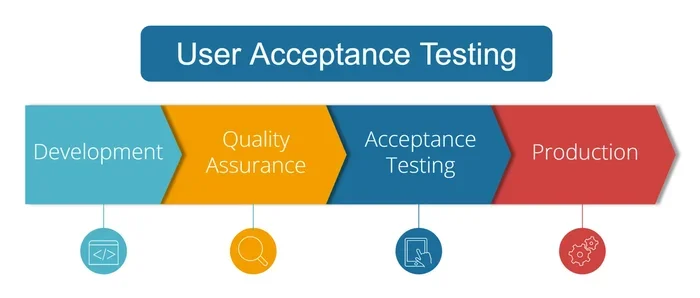
The uat meaning stands for User Acceptance Testing, a vital phase in the software testing lifecycle where real users validate whether the product works as expected. UAT meaning covers everything from defining acceptance criteria to getting final stakeholder approval before software goes live. Understanding the uat meaning helps teams catch bugs early, reduce risks, and deliver a product that truly meets business needs and end user expectations.
If you have ever wondered about the uat meaning in software development, you are not alone. Many people hear this term in meetings but never get a clear explanation. UAT stands for User Acceptance Testing, and it is one of the most important phases in the entire software testing lifecycle. In simple terms, it is the stage where real users check whether a product works as expected before it goes live.
The uat meaning goes far beyond just clicking buttons and reporting bugs. It is about making sure the software meets business needs, satisfies end users, and is ready for production. Without proper user acceptance testing, even the most technically sound application can fail in the real world. This article breaks down everything you need to know about uat meaning, why it matters, and how to do it right.
Whether you are a developer, a project manager, or a business stakeholder, understanding the uat meaning will help you deliver better software. Let us dive in and explore this essential phase step by step.
Key Takeaways
- UAT meaning: User Acceptance Testing is the final testing phase where real users validate the software before production launch.
- It matters because it catches real-world bugs, ensures business requirements are met, and builds confidence among stakeholders.
- There are several types of UAT, including alpha testing, beta testing, contract acceptance testing, and regulation acceptance testing.
- The UAT process follows clear steps, from defining acceptance criteria to executing test cases and getting final approval.
- Common challenges include unclear requirements, limited user participation, and poor test environment setup.
- Best practices include early planning, using real world data, and keeping communication open across teams.
- UAT differs from other testing types like functional testing and regression testing in its focus on end user validation.
📑 Table of Contents
- What Is The UAT Meaning In Software Testing?
- Why UAT Matters In Software Development
- Types Of UAT You Should Know About
- The UAT Process Step By Step
- Common UAT Challenges And How To Overcome Them
- Best Practices For A Successful UAT
- UAT Compared To Other Testing Types
- Key Tools Used In UAT
- Conclusion
What Is The UAT Meaning In Software Testing?
The Simple Definition Of UAT
The uat meaning is straightforward. User Acceptance Testing is a phase in the software development process where actual end users test the application to confirm it works as intended. The goal is simple: make sure the software is ready for real world use before it reaches the production environment.
During this phase, users run through test scenarios that reflect their daily tasks. They check whether the software deployment meets their expectations and whether the business requirements have been fulfilled. If the software passes all checks, it gets the green light for launch. If not, the team fixes issues and retests.
Think of it as a final quality gate. Before any software reaches the hands of customers, it must go through user acceptance testing. This is where the rubber meets the road, and the uat meaning really comes to life.
Where UAT Fits In The Software Testing Lifecycle
Understanding the uat meaning also means knowing where it sits in the bigger picture. The software testing lifecycle has several phases, and UAT is typically the last one before release. Here is how it fits in:
- Unit Testing: Developers test individual code components.
- Integration Testing: Different modules are tested together.
- System Testing: The entire system is tested as a whole.
- Functional Testing: Specific functions are validated against requirements.
- Regression Testing: New changes are checked against existing features.
- User Acceptance Testing: Real users validate the product for production readiness.
Each phase builds on the previous one. By the time the uat meaning comes into play, all technical bugs should already be resolved. UAT focuses on the user experience, business logic, and real world functionality.
Core Elements Of UAT
Several key elements make up the uat meaning in practice. These include:
- Acceptance Criteria: Clear conditions that the software must meet to be accepted.
- Test Scenarios: Real world situations users will encounter.
- Test Cases: Specific steps users follow to validate features.
- Defect Tracking: A system for logging and managing issues found during testing.
- Stakeholder Approval: Formal sign off from business leaders and project owners.
All of these elements work together to ensure that the uat meaning is fully realized. Without any one of them, the testing phase becomes incomplete and risky.
Why UAT Matters In Software Development
Preventing Costly Post Launch Bugs
One of the biggest reasons the uat meaning matters is bug prevention. Bugs caught during UAT are far cheaper to fix than bugs found after launch. Studies show that fixing a defect after release can cost 10 to 100 times more than fixing it during testing. The uat meaning is essentially about saving money and protecting your brand reputation.
When real users test the software, they find issues that automated tools might miss. They notice confusing interfaces, slow workflows, and features that do not match their needs. This bug detection happens in a safe environment, not in front of paying customers.
Ensuring End User Validation
The whole point of user acceptance testing is end user validation. No matter how good the code looks, the software only matters if users can actually use it. The uat meaning puts the focus squarely on the people who will interact with the product every day.
During UAT, users verify that the software supports their workflows, meets their expectations, and delivers value. This end-user validation step is what separates a technically complete product from a truly usable one. It is the difference between “it works” and “it works well for the people who need it.”
Meeting Business Requirements
Another critical aspect of the uat meaning is making sure the software meets business requirements. Developers build features based on specifications, but those specifications can sometimes miss the mark. UAT gives stakeholders a chance to confirm that what was built matches what was promised.
This stakeholder approval process is essential for project success. It ensures everyone is aligned and that the software delivers the expected value. Without it, teams risk building something that looks right but fails to solve the actual problem.
Building Confidence For Production Readiness
The uat meaning also builds confidence. When users sign off on the software, the entire team gains peace of mind. The production readiness checklist is complete, risks are minimized, and the path to launch is clear.
This confidence is especially important in regulated industries where mistakes can have serious consequences. The uat meaning serves as documented proof that the software was thoroughly vetted by the people who matter most: the users.
Types Of UAT You Should Know About
Alpha Testing
Alpha testing is one of the first forms of user acceptance testing. It takes place in a controlled environment, often within the organization. A small group of internal users or selected customers tests the software before it is released to a wider audience. The uat meaning in alpha testing is about catching major issues early and gathering initial feedback.
Alpha testing usually happens in a dedicated test environment that closely mimics production. Testers follow test cases and report any defects they find. This early feedback loop helps the team fix critical issues before moving to the next phase.
Beta Testing
Beta testing takes the uat meaning a step further. It involves releasing the software to a larger group of external users in a real world setting. These users interact with the product as they normally would, providing honest feedback about their experience.
Beta testing is a powerful form of end-user validation. It reveals issues that only surface in real environments, such as performance problems, compatibility issues, and usability challenges. Many successful software products rely heavily on beta testing to refine their production readiness before a full launch.
Contract Acceptance Testing
In some industries, the uat meaning includes contract acceptance testing. This happens when a vendor builds software for a client based on a formal agreement. The client tests the software against the contract terms to ensure all requirements are met.
This type of testing is common in enterprise software projects and government contracts. The acceptance criteria are clearly defined in the contract, and the client must formally approve the software before payment is released.
Regulation Acceptance Testing
Regulation acceptance testing is another important type of user acceptance testing. It is used in industries where software must comply with strict regulations, such as healthcare, finance, and aviation. The uat meaning here includes verifying that the software meets all legal and regulatory standards.
This type of testing often involves specialized test scenarios that simulate compliance requirements. It ensures that the software is not only functional but also legally sound before it goes into production.
The UAT Process Step By Step
Step 1: Define Acceptance Criteria
The first step in understanding the uat meaning in practice is defining acceptance criteria. These are the specific conditions the software must meet to be considered acceptable. Clear criteria prevent confusion and give testers a concrete way to evaluate the product.
Acceptance criteria should be written in simple language and tied directly to business requirements. Each criterion should be measurable and testable. When the criteria are well defined, the entire UAT process becomes smoother and more effective.
Step 2: Prepare Test Scenarios
Once acceptance criteria are set, the next step is preparing test scenarios. These are real world situations that users will encounter during daily work. Good test scenarios cover both happy paths and edge cases.
For example, a test scenario for an e-commerce platform might include placing an order, applying a discount code, and processing a refund. Each scenario should map to specific user stories and reflect actual user behavior. This step is where the uat meaning starts to take shape in a practical way.
Step 3: Execute Test Cases
With test scenarios ready, users begin executing test cases. A test case is a detailed set of steps that guides the user through a specific validation task. Each test case should have a clear expected outcome.
During test execution, users document their findings. They note whether each test case passes or fails. Any failures are logged as defects for the development team to address. This test execution phase is the heart of the uat meaning and where the most valuable insights are generated.
Step 4: Track Defects And Manage Them
When issues are found during UAT, they need to be tracked and managed properly. Defect tracking tools help teams log bugs, assign them to developers, and monitor their resolution. Without a proper tracking system, defects can slip through the cracks and delay the launch.
Each defect should include a clear description, steps to reproduce, severity level, and impact on the user. The team prioritizes defects based on their severity and business impact. Critical bugs must be fixed before the software can move forward, while minor issues may be addressed in a subsequent release.
Step 5: Get Stakeholder Approval
The final step in the uat meaning process is getting formal stakeholder approval. Once all critical defects are resolved and test scenarios pass, business leaders review the results and sign off on the software.
This approval marks the transition from testing to software deployment. It is a formal acknowledgment that the software meets all requirements and is ready for production. Without stakeholder sign off, the team should not proceed to launch, no matter how confident they feel.
Common UAT Challenges And How To Overcome Them
Unclear Requirements
One of the biggest obstacles to effective user acceptance testing is unclear requirements. When business needs are vague or poorly documented, testers cannot validate the software properly. This leads to confusion, missed defects, and wasted effort.
The solution is to invest time in requirement gathering before UAT begins. Use user stories and acceptance criteria to make expectations crystal clear. Regular communication between business and technical teams helps ensure everyone is on the same page.
Limited User Involvement
Another common challenge is getting enough users to participate in UAT. Busy schedules, lack of interest, and unclear expectations can all reduce participation. When too few users test the software, important issues go undetected.
To overcome this, make UAT participation easy and rewarding. Provide clear instructions, set realistic time expectations, and show users how their feedback directly improves the product. The more engaged users are, the more valuable the uat meaning becomes.
Inadequate Test Environment Setup
A poor test environment can undermine the entire UAT process. If the environment does not closely match production, users may encounter issues that are not real problems, or miss issues that are. This leads to unreliable test results and false confidence.
Invest in setting up a test environment that mirrors production as closely as possible. Include the same data volumes, configurations, and integrations. A well prepared environment is essential for meaningful end-user validation and accurate production readiness assessment.
Time Pressure And Tight Deadlines
UAT is often rushed because teams feel pressure to meet launch dates. When time is short, testing gets cut short, and critical bugs go undetected. This is one of the most damaging shortcuts in the software development process.
To avoid this, plan UAT early in the project timeline. Build in buffer time for retesting and defect fixes. Remember that skipping or rushing UAT almost always leads to more problems after launch. Proper planning is the key to balancing speed with quality.
Best Practices For A Successful UAT
Start Planning Early
One of the most important quick tips for UAT is to start planning early. Do not wait until the software is almost complete to think about testing. Begin defining acceptance criteria, identifying test users, and preparing scenarios as soon as requirements are clear.
Early planning gives you time to address issues before they become urgent. It also helps you build a realistic timeline and allocate the right resources. The uat meaning is much easier to achieve when preparation happens from the start.
Use Real World Test Data
Another key practice is using real world data in your test environment. Synthetic or simplified data does not accurately reflect the complexity of production. Real data helps users find issues that would only appear in actual use.
Make sure your test data covers a wide range of scenarios, including edge cases and error conditions. This approach dramatically improves the quality of user acceptance testing and gives you more confidence in the results.
Keep Communication Open
Open communication between testers, developers, and business stakeholders is essential for successful UAT. Everyone should understand the goals, progress, and any issues that arise during testing.
Hold regular check-ins, share updates frequently, and encourage honest feedback. When communication flows freely, the team can resolve defects faster and keep the project on track. This collaborative approach is at the heart of the uat meaning and what makes it truly effective.
Document Everything
Thorough documentation is a best practice that pays off in the long run. Record every test case, every defect, and every decision made during UAT. This documentation serves as a reference for future testing cycles and provides audit trails for compliance.
Good documentation also helps new team members understand the history of the project and the reasoning behind key decisions. It is a simple habit that significantly improves the quality and repeatability of the user acceptance testing process.
UAT Compared To Other Testing Types
Understanding the uat meaning also means knowing how it differs from other testing types. Many people confuse UAT with functional testing, regression testing, or quality assurance. While these phases overlap, each has a distinct purpose. The table below highlights the key differences.
| Testing Type | Who Performs It | Primary Focus | When It Happens |
|---|---|---|---|
| Functional Testing | QA Engineers | Individual features and functions | During system testing |
| Regression Testing | QA Engineers | Impact of new changes on existing features | After code changes |
| Quality Assurance | QA Teams | Overall process and standards | Throughout development |
| User Acceptance Testing | End Users | Business needs and real world usability | Before production launch |
The key difference is the perspective. While functional and regression testing focus on technical correctness, the uat meaning centers on business value and user satisfaction. UAT answers the question that no other testing type can: “Does this software actually work for the people who will use it every day?”
Expert Insight: Many teams make the mistake of skipping UAT because they trust their internal testing. However, internal testers think like developers, not like users. The uat meaning captures a perspective that no other testing phase can replicate. Skipping it is like building a house and never letting the residents check if the doors open properly.
Another important distinction is that UAT is not a replacement for quality assurance or functional testing. It is the final layer of validation that sits on top of all other testing efforts. Each type of testing serves a purpose, and together they create a comprehensive safety net for your software.
When all testing types work together, the result is a product that is technically sound, functionally complete, and genuinely useful to its users. The uat meaning ties everything together by bringing the human element into the final validation.
Key Tools Used In UAT
Several tools support the uat meaning in practice. Defect tracking platforms like Jira and Bugzilla help teams manage issues found during testing. Test management tools like TestRail and Zephyr organize test cases and track execution progress. Collaboration platforms like Slack and Microsoft Teams keep communication flowing between testers and developers.
Some teams also use test automation tools to speed up repetitive validation tasks. However, UAT is fundamentally a manual process driven by real user judgment. Automation can support UAT, but it should never replace the human perspective that gives the uat meaning its value.
Choosing the right tools depends on your team size, budget, and project complexity. The most important thing is that the tools you select make the UAT process smoother, not more complicated. Keep it simple and focus on the people doing the testing.
Conclusion
The uat meaning is clear and powerful. User Acceptance Testing is the final gatekeeper that ensures software is ready for real world use. It protects your investment, satisfies your users, and builds confidence in every launch. By understanding the uat meaning and following a structured process, you can deliver software that truly works for the people who need it most.
Remember that user acceptance testing is not just a checklist item. It is a mindset that puts the user at the center of quality. Every test scenario, every acceptance criterion, and every stakeholder approval serves a purpose: making sure the software delivers real value. Embrace the uat meaning in your next project, and you will see the difference it makes in every release.
Start applying these practices today. Define your criteria clearly, involve real users early, and never rush the final validation. The uat meaning is your guide to building software that people love to use.
Frequently Asked Questions
What Does UAT Stand For?
UAT stands for User Acceptance Testing. It is the final phase of the software testing lifecycle where real end users validate the product before it goes live. The uat meaning centers on confirming that the software meets business needs and works well for the people who will actually use it.
Who Is Responsible For UAT?
End users and business stakeholders are primarily responsible for UAT. While the QA team supports the process by setting up the test environment and managing tools, the actual validation is performed by real users. Their feedback is what gives the uat meaning its true value and purpose.
When Should UAT Begin In A Project?
UAT planning should begin early, ideally during the requirements gathering phase. However, actual UAT execution typically starts after system testing and regression testing are complete. The uat meaning is most effective when users test a stable product that has already passed technical validation.
What Happens If UAT Fails?
If UAT fails, the software does not move to production. The team reviews the defects, fixes them, and retests. This cycle continues until all critical issues are resolved and stakeholders give their approval. The uat meaning demands that the software fully meets acceptance criteria before launch.
How Is UAT Different From QA Testing?
QA testing focuses on technical correctness and finding defects. UAT focuses on business value and user satisfaction. While QA asks “does it work correctly?”, UAT asks “does it work for the user?” The uat meaning is all about the human perspective that QA testing alone cannot provide.
Can UAT Be Automated?
Some aspects of UAT can be supported by automation, but the core of UAT relies on human judgment. Real users bring context, intuition, and experience that automated tools cannot replicate. The uat meaning depends on authentic user interaction, so automation should complement, not replace, manual testing.